AKS Workload Identity Flow with Azure Key Vault
A complete walkthrough of passwordless secret access in AKS using Workload Identity, Azure Active Directory Federated Credentials, and the CSI Secret Store Driver — no static credentials, no secrets in YAML.
Introduction
Managing secrets in Kubernetes is one of those problems that looks simple on the surface but has real security implications beneath. The naive approach — baking credentials into environment variables or ConfigMaps — works, but leaves sensitive data exposed in etcd, container specs, and logs.
In this blog, I walk through a production-grade approach: using AKS Workload Identity together with the CSI Secret Store Driver to pull secrets from Azure Key Vault without ever handling a password, client secret, or static credential.
This is not just a how-to. The goal is to understand every component in the chain — why it exists, what problem it solves, and how it connects to the next piece.
What Problem Are We Solving?
Traditional approaches to secrets in Kubernetes fall into one of these categories:
- Hardcoded credentials in environment variables — simple but dangerous
- Kubernetes Secrets — base64-encoded (not encrypted) and stored in etcd
- Init containers that fetch secrets at startup — better, but requires managing a service principal with a password
- Vault agent sidecars — powerful but adds operational complexity
Each of these involves some form of static credential — something that can be leaked, rotated incorrectly, or forgotten in a Git history.
Workload Identity eliminates the static credential entirely. Instead of asking a pod to prove who it is with a password, the cluster vouches for it using a cryptographically signed token that Azure AD can verify directly.
Tech Stack
| Component | Technology |
|---|---|
| Container Orchestration | Azure Kubernetes Service (AKS) |
| Identity Provider | Azure Active Directory (Entra ID) |
| Secret Store | Azure Key Vault |
| Identity Mechanism | Workload Identity (OIDC + Managed Identity) |
| Secret Delivery | CSI Secret Store Driver |
| Auth Protocol | OpenID Connect (OIDC) |
| Token Type | Signed JWT (JSON Web Token) |
Architecture Overview
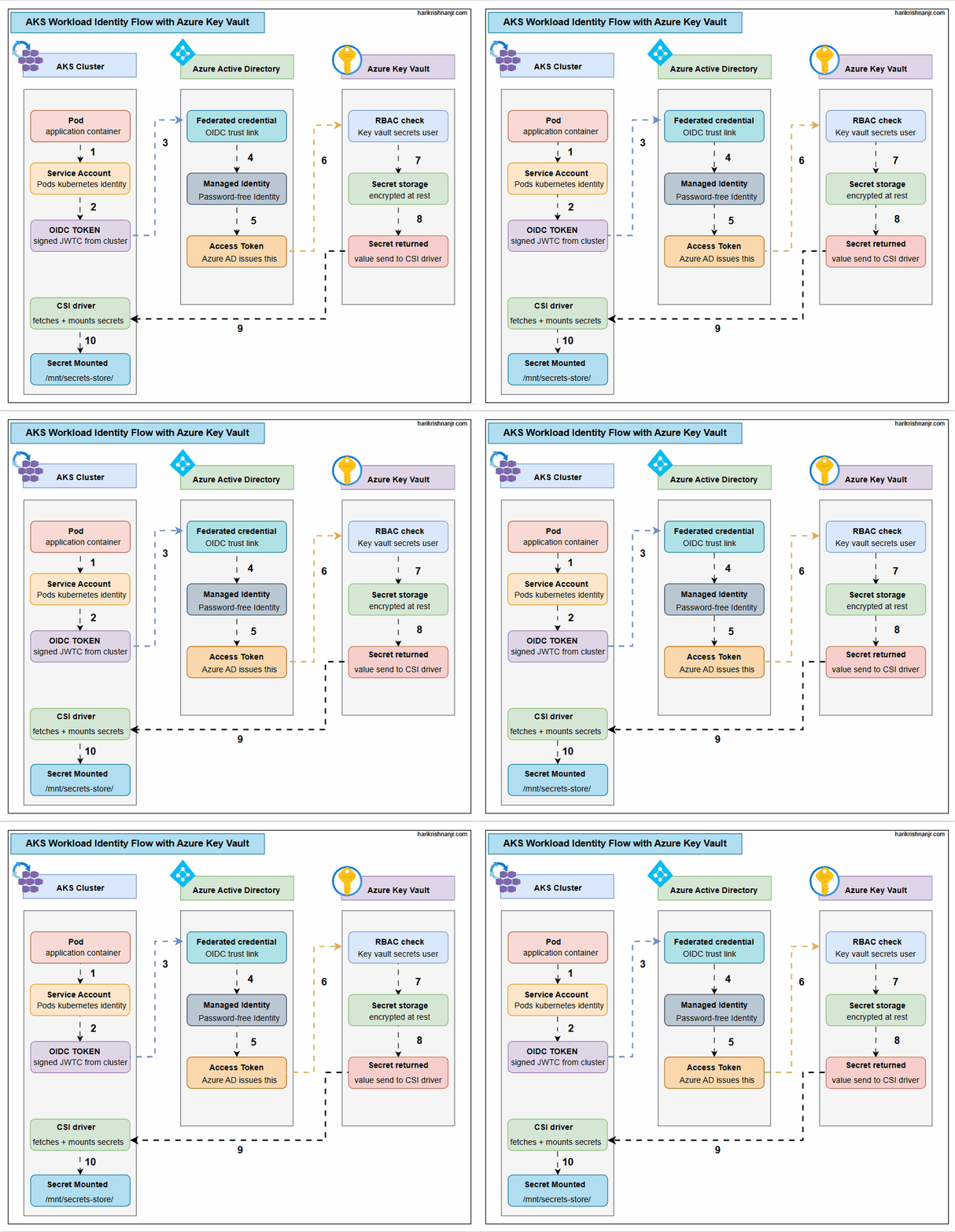 Full flow — Pod → OIDC Token → Azure AD → Access Token → Key Vault → CSI Driver → Mounted Secret
The architecture spans three Azure services — AKS, Azure Active Directory, and Azure Key Vault — and involves three components inside the cluster itself.
- Inside AKS Cluster: Pod → Service Account → OIDC Token → CSI Driver → Mounted Secret
- Azure Active Directory: Federated Credential validates OIDC token → issues Access Token via Managed Identity
- Azure Key Vault: RBAC check → returns encrypted secret → CSI driver mounts it
Complete Flow — Step by Step
| Step | Action | Description |
|---|---|---|
| 1 | Pod → Service Account | Application pod uses its Kubernetes Service Account as identity |
| 2 | Service Account → OIDC Token | AKS issues a signed JWT (OIDC Token) for the Service Account |
| 3 | OIDC Token → Azure AD | Token sent to Azure AD via Federated Credential (OIDC trust link) |
| 4 | Azure AD validates | Federated Credential verifies the OIDC token's issuer and subject |
| 5 | Azure AD issues Access Token | Managed Identity (password-free) receives an Access Token from Azure AD |
| 6 | Access Token → Key Vault | Access Token presented to Azure Key Vault for authorization |
| 7 | RBAC Check | Key Vault validates Key Vault Secrets User role assignment |
| 8 | Secret Returned | Encrypted secret value sent to the CSI driver |
| 9 | CSI Driver receives secret | CSI Secret Store Driver fetches and mounts the secret |
| 10 | Secret Mounted in Pod | Secret available at /mnt/secrets-store/ inside the container |
Deep Dive: Each Component
1. Pod and Service Account
Every pod in Kubernetes runs under a Service Account. By default this is the default service account in the namespace — but for Workload Identity to work, you create a dedicated Service Account and annotate it with the Managed Identity's client ID.
apiVersion: v1
kind: ServiceAccount
metadata:
  name: workload-identity-sa
  namespace: robot-shop
  annotations:
    azure.workload.identity/client-id: "<MANAGED_IDENTITY_CLIENT_ID>"
2. OIDC Token
When the pod starts, the kubelet mounts a projected volume containing a signed JWT — the OIDC Token. This token is issued by the cluster's OIDC issuer URL and contains the pod's namespace and service account name as claims.
This is not a secret. It is a cryptographically signed statement from the cluster: this pod is running as this service account in this namespace. Azure AD can verify its authenticity without ever contacting the cluster directly — it just needs the cluster's public OIDC discovery endpoint.
3. Federated Credential — The Trust Bridge
On the Azure AD side, you create a Federated Credential on the Managed Identity. This tells Azure AD:
- Trust tokens issued by this OIDC issuer (your AKS cluster)
- Where the subject claim matches this service account
This is the key security boundary. Without this configuration, Azure AD would reject any token from the cluster — even a valid one.
az identity federated-credential create \
  --name <FEDERATED_CREDENTIAL_NAME> \
  --identity-name <MANAGED_IDENTITY_NAME> \
  --resource-group <RG_NAME> \
  --issuer <AKS_OIDC_ISSUER_URL> \
  --subject system:serviceaccount:<NAMESPACE>:<SERVICE_ACCOUNT_NAME>
4. Managed Identity — Password-Free Identity
The Managed Identity is an Azure-native identity that has no password, no client secret, and no expiry. It is managed entirely by Azure. You assign Azure RBAC roles to it — in this case, Key Vault Secrets User on the Key Vault.
The pod never holds this identity's credentials. It only holds the OIDC Token, which proves it has the right to assume this identity.
5. Access Token from Azure AD
Azure AD validates the OIDC Token against the Federated Credential configuration. If the issuer URL matches and the subject (namespace/service account) matches, Azure AD issues an Access Token scoped to Azure Key Vault.
This token is short-lived (typically 1 hour) and automatically rotated. No manual rotation. No secret sprawl.
6 & 7. Key Vault RBAC Check
The Access Token is presented to Azure Key Vault. Key Vault validates the token and checks whether the Managed Identity has the Key Vault Secrets User role on this specific Key Vault instance.
If the role assignment exists, access is granted. If not — even with a valid token — access is denied. This is Azure RBAC at the data plane level.
8 & 9. Secret Returned to CSI Driver
Key Vault returns the secret value (still encrypted in transit). The CSI Secret Store Driver receives this value and prepares to mount it inside the pod.
10. Secret Mounted at /mnt/secrets-store/
The CSI driver mounts the secret as a file inside the container at the path defined in your SecretProviderClass. The application reads it like a regular file — no SDK, no API call, no environment variable injection required.
volumeMounts:
  - name: secrets-store
    mountPath: "/mnt/secrets-store"
    readOnly: true
volumes:
  - name: secrets-store
    csi:
      driver: secrets-store.csi.k8s.io
      readOnly: true
      volumeAttributes:
        secretProviderClass: "azure-keyvault-provider"
Prerequisites
Before you begin, ensure the following are in place:
- AKS Cluster with OIDC Issuer enabled — Required for the cluster to issue OIDC tokens. Enable with
--enable-oidc-issuerat creation or update an existing cluster. - Workload Identity add-on enabled on AKS — Install via
--enable-workload-identityflag. This deploys the mutating webhook that injects the OIDC token into pods. - CSI Secret Store Driver installed — Install the
secrets-store-csi-driverand azure provider via Helm or AKS add-on. - Azure Key Vault created — The Key Vault that will store your application secrets.
- User-Assigned Managed Identity — Created in Azure, with Key Vault Secrets User role assigned on the Key Vault.
Step-by-Step Setup
Step 1 — Enable OIDC and Workload Identity on AKS
az aks update \
  --resource-group <RG_NAME> \
  --name <CLUSTER_NAME> \
  --enable-oidc-issuer \
  --enable-workload-identity
Get the OIDC issuer URL — you will need this when creating the Federated Credential:
az aks show \
  --resource-group <RG_NAME> \
  --name <CLUSTER_NAME> \
  --query "oidcIssuerProfile.issuerUrl" \
  -o tsv
Step 2 — Create Managed Identity and Assign Key Vault Role
az identity create \
  --name <MANAGED_IDENTITY_NAME> \
  --resource-group <RG_NAME>

# Get the principal ID
PRINCIPAL_ID=$(az identity show \
  --name <MANAGED_IDENTITY_NAME> \
  --resource-group <RG_NAME> \
  --query principalId -o tsv)

# Assign Key Vault Secrets User role
az role assignment create \
  --assignee $PRINCIPAL_ID \
  --role "Key Vault Secrets User" \
  --scope $(az keyvault show --name <KV_NAME> --query id -o tsv)
Step 3 — Create Federated Credential
az identity federated-credential create \
  --name <FEDERATED_CREDENTIAL_NAME> \
  --identity-name <MANAGED_IDENTITY_NAME> \
  --resource-group <RG_NAME> \
  --issuer <OIDC_ISSUER_URL> \
  --subject system:serviceaccount:<NAMESPACE>:<SERVICE_ACCOUNT_NAME>
Step 4 — Create Kubernetes Service Account
kubectl create namespace robot-shop

cat <<EOF | kubectl apply -f -
apiVersion: v1
kind: ServiceAccount
metadata:
  name: workload-identity-sa
  namespace: robot-shop
  annotations:
    azure.workload.identity/client-id: "<MANAGED_IDENTITY_CLIENT_ID>"
EOF
Step 5 — Create SecretProviderClass
apiVersion: secrets-store.csi.x-k8s.io/v1
kind: SecretProviderClass
metadata:
  name: azure-keyvault-provider
  namespace: robot-shop
spec:
  provider: azure
  parameters:
    usePodIdentity: "false"
    clientID: "<MANAGED_IDENTITY_CLIENT_ID>"
    keyvaultName: "<KEY_VAULT_NAME>"
    objects: |
      array:
        - |
          objectName: db-password
          objectType: secret
    tenantId: "<AZURE_TENANT_ID>"
Step 6 — Mount Secret in Pod
spec:
  serviceAccountName: workload-identity-sa
  containers:
    - name: app
      image: my-app:latest
      volumeMounts:
        - name: secrets-store
          mountPath: "/mnt/secrets-store"
          readOnly: true
  volumes:
    - name: secrets-store
      csi:
        driver: secrets-store.csi.k8s.io
        readOnly: true
        volumeAttributes:
          secretProviderClass: "azure-keyvault-provider"
What You Actually Learn From This Setup
Zero-credential architecture is achievable
No passwords. No client secrets. No service principal keys rotated on a schedule. The cluster vouches for the pod using cryptographic tokens, and Azure AD validates them without any pre-shared secret.
OIDC federation is the foundation
The Federated Credential is the piece most tutorials gloss over. Understanding it — what it trusts, what claims it validates, and why it is scoped to a specific namespace and service account — is what turns this from a copy-paste exercise into a real security primitive.
RBAC at the data plane matters
Having a valid Access Token is not enough. Key Vault still enforces its own RBAC. You can have a perfectly valid identity and still be denied if the role assignment is missing or scoped to the wrong Key Vault.
CSI driver decouples secrets from application code
The application reads a file. It does not know about Azure, Key Vault, OIDC, or Managed Identity. That decoupling is valuable — you can swap the secret backend without touching application code.
Automatic rotation works transparently
When a secret is rotated in Key Vault, the CSI driver can refresh the mounted file automatically. No pod restart required, no manual intervention.
Complete Flow Summary
AKS cluster with OIDC issuer enabled
        ↓
Workload Identity webhook injects OIDC token into pod
        ↓
Pod presents OIDC token to Azure AD
        ↓
Federated Credential validates issuer + subject
        ↓
Azure AD issues Access Token for Managed Identity
        ↓
Access Token presented to Azure Key Vault
        ↓
Key Vault checks RBAC → Key Vault Secrets User role
        ↓
Secret returned to CSI Secret Store Driver
        ↓
Secret mounted at /mnt/secrets-store/ inside container
        ↓
Application reads secret as a regular file
Takeaway
AKS Workload Identity with CSI Secret Store Driver is the cleanest approach to secrets management in Azure Kubernetes environments. It eliminates static credentials entirely, integrates naturally with Azure RBAC, and keeps secrets out of your Kubernetes manifests, environment variables, and etcd.
Once you understand the trust chain — cluster issues OIDC token → Azure AD validates via Federated Credential → Managed Identity receives Access Token → Key Vault checks RBAC → CSI driver mounts secret — the whole system becomes transparent.
If you are setting this up yourself, break things intentionally. Remove the Federated Credential and watch the authentication fail. Delete the RBAC role assignment and see Key Vault reject the token. The fastest way to understand a security system is to understand exactly what each gate is checking.
Resources
- AKS Workload Identity: docs.microsoft.com/azure/aks/workload-identity-overview
- CSI Secret Store Driver: secrets-store-csi-driver.sigs.k8s.io
- Managed Identity Overview: docs.microsoft.com/azure/active-directory/managed-identities-azure-resources
- OIDC Federation: docs.microsoft.com/azure/active-directory/workload-identities/workload-identity-federation
Connect With Me
For a detailed project walkthrough, step-by-step implementation, and live demo, feel free to connect with me.
Connect with me on LinkedIn and follow for more DevOps and Kubernetes projects.