Serverless Event-Driven Architecture — Azure Blob Trigger Internals
A technical breakdown of how Azure Blob Trigger works internally — from blob upload to function execution.
What is Azure Blob Trigger?
Azure Blob Trigger is a feature of Azure Functions that automatically invokes a function when a new file is uploaded to an Azure Blob Storage container. No manual polling, no timer — the runtime handles detection entirely.
Architecture Overview
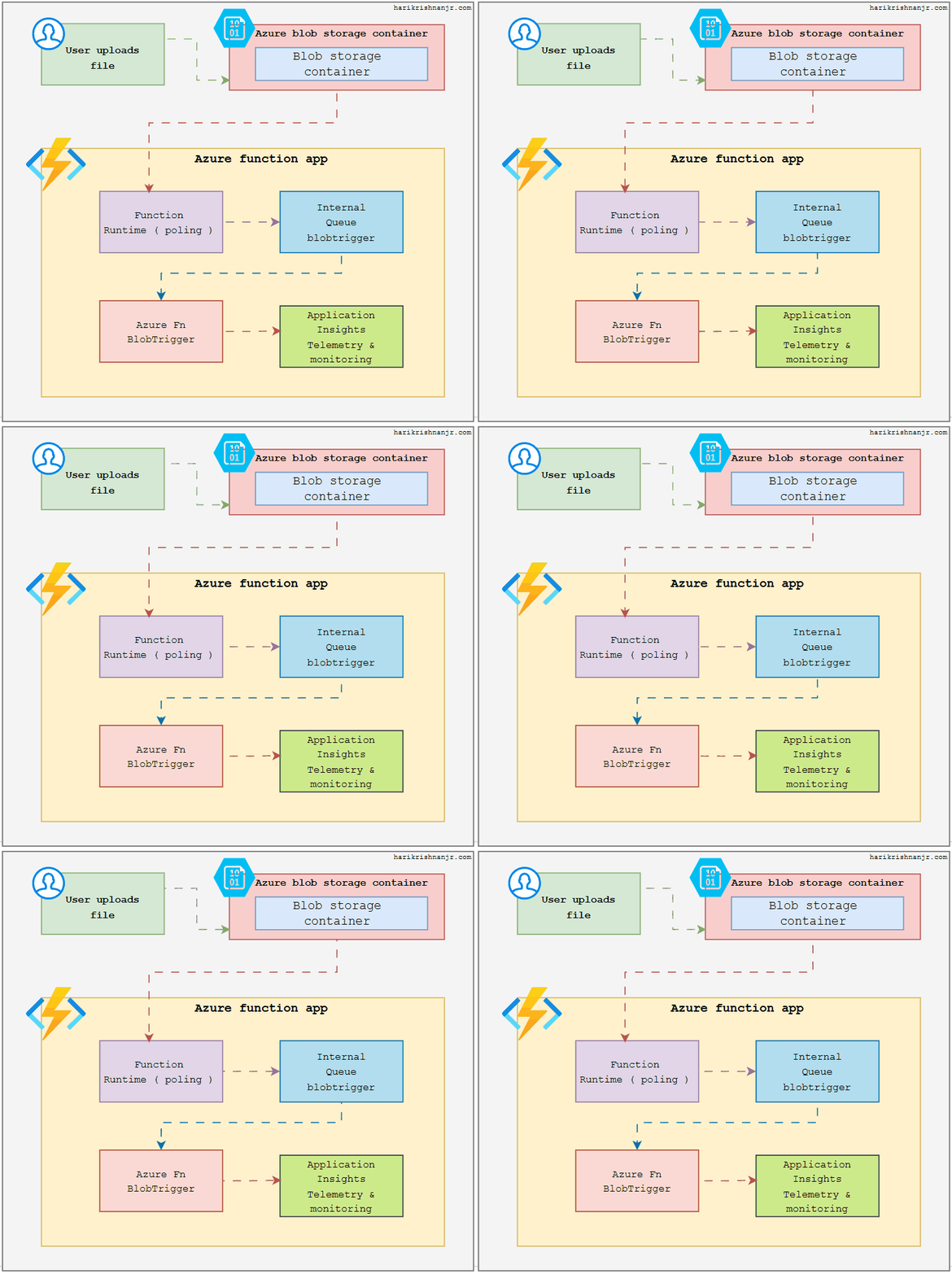 Full internal flow — from user upload to function execution and telemetry
The architecture consists of five components:
| Component | Responsibility |
|---|---|
| User | Uploads a file to the Blob Storage container |
| Azure Blob Storage | Stores the uploaded file |
| Function Runtime (polling) | Detects new blobs by scanning the container |
| Internal Queue (BlobTrigger) | Holds the work order that invokes the function |
| Azure Fn BlobTrigger | Executes your business logic |
| Application Insights | Captures telemetry for the entire Function App |
How the Flow Works
1. User Uploads a File
The user uploads a file to the Azure Blob Storage container via SDK, REST API, Azure Portal, or SAS URL. The file lands in the configured container path — for example samples-workitems/file.png.
2. Function Runtime Detects the New Blob
The Function Runtime runs a continuous polling loop that scans the blob container at regular intervals (approximately every 10 seconds on the Consumption plan).
Before raising any action, the runtime checks the azure-webjobs-hosts container for a blob receipt:
azure-webjobs-hosts/
  blobreceipts/
    BlobTrigger1/
      samples-workitems/file.png    ← processed
      samples-workitems/report.csv  ← processed
- Receipt exists → blob already processed, skip.
- No receipt → new blob, write a queue message.
Consumption vs Premium plan: Polling introduces a ~10 second detection delay. On the Premium or Dedicated plan, use an Event Grid trigger for near-instant invocation.
3. Internal Queue Receives the Work Order
The runtime does not invoke your function directly. It writes a message into a hidden Azure Storage Queue:
{
  "blobName": "file.png",
  "containerName": "samples-workitems"
}
This queue — named something like azure-webjobs-blobtrigger-blobtrigger1 — is what actually triggers your function. This indirection provides two guarantees:
- Success → queue message deleted + blob receipt written. Blob will never be re-processed.
- Failure → message stays in the queue. Azure retries automatically. After max retries, message moves to a poison queue.
4. Azure Fn BlobTrigger Executes
The queue message fires your BlobTrigger function. Azure passes the blob in as an InputStream object containing:
myblob.name— full blob path e.g.samples-workitems/file.pngmyblob.length— file size in bytesmyblob.read()— raw file content
import azure.functions as func
import logging

app = func.FunctionApp()

@app.blob_trigger(
    arg_name="myblob",
    path="samples-workitems/{name}",
    connection="AzureWebJobsStorage"
)
def BlobTrigger1(myblob: func.InputStream):
    logging.info(
        f"Name: {myblob.name} | Size: {myblob.length} bytes"
    )
| Parameter | Value | Purpose |
|---|---|---|
arg_name | "myblob" | Variable name the blob is passed as |
path | "samples-workitems/{name}" | Container to watch — {name} is a wildcard |
connection | "AzureWebJobsStorage" | Storage account connection string |
The default boilerplate only logs the blob name and size. In production, replace the function body with your actual logic:
# Image processing
image = Image.open(myblob)
image.thumbnail((800, 800))

# Data ingestion
data = json.loads(myblob.read())
db.insert(data)

# Virus scan
result = antivirus.scan(myblob.read())
if result.infected:
    delete_blob(myblob.name)
5. Application Insights Captures Telemetry
Application Insights is connected at the Function App level — not per function. It automatically captures:
- Invocation logs
- Execution duration
- Success / failure status
- Exceptions and stack traces
- Custom logs written inside your function
No additional setup is needed inside the function body. Telemetry is sent automatically on every execution.
Internal Queue vs Blob Receipt — Key Difference
These two are often confused:
| Internal Queue | Blob Receipt | |
|---|---|---|
| Purpose | Triggers the function, handles retries | Prevents re-processing the same blob |
| Lifetime | Temporary — deleted on success | Permanent |
| Created by | Polling runtime when a new blob is found | Runtime after successful function execution |
| Location | azure-webjobs-blobtrigger-* queue | azure-webjobs-hosts/blobreceipts/ container |
The queue is a short-lived task list. The receipt is the permanent completion record.
Correct Trigger Chain
A common misconception is that the runtime directly calls the BlobTrigger function. The actual chain is:
Polling Runtime → Internal Queue → BlobTrigger Function
The runtime writes to the queue. The queue invokes the function. The direct runtime → function path does not exist.