End-to-End GitOps CI/CD Pipeline using Azure DevOps, Docker, ACR, Kubernetes and ArgoCD
A complete end-to-end GitOps CI/CD pipeline — from code commit to Kubernetes deployment — using Azure DevOps, Docker, ACR, Kubernetes, and ArgoCD.
Introduction
Modern DevOps practices focus on automation, reliability, and continuous delivery. In this project, I implemented a complete end-to-end GitOps CI/CD pipeline using Azure DevOps, Docker, Azure Container Registry (ACR), Kubernetes, and ArgoCD.
The main goal of this implementation is to automate the entire application deployment lifecycle — from code commit to Kubernetes deployment — using Git as the single source of truth.
This project demonstrates how real-world DevOps teams build scalable and automated deployment pipelines.
Project Overview
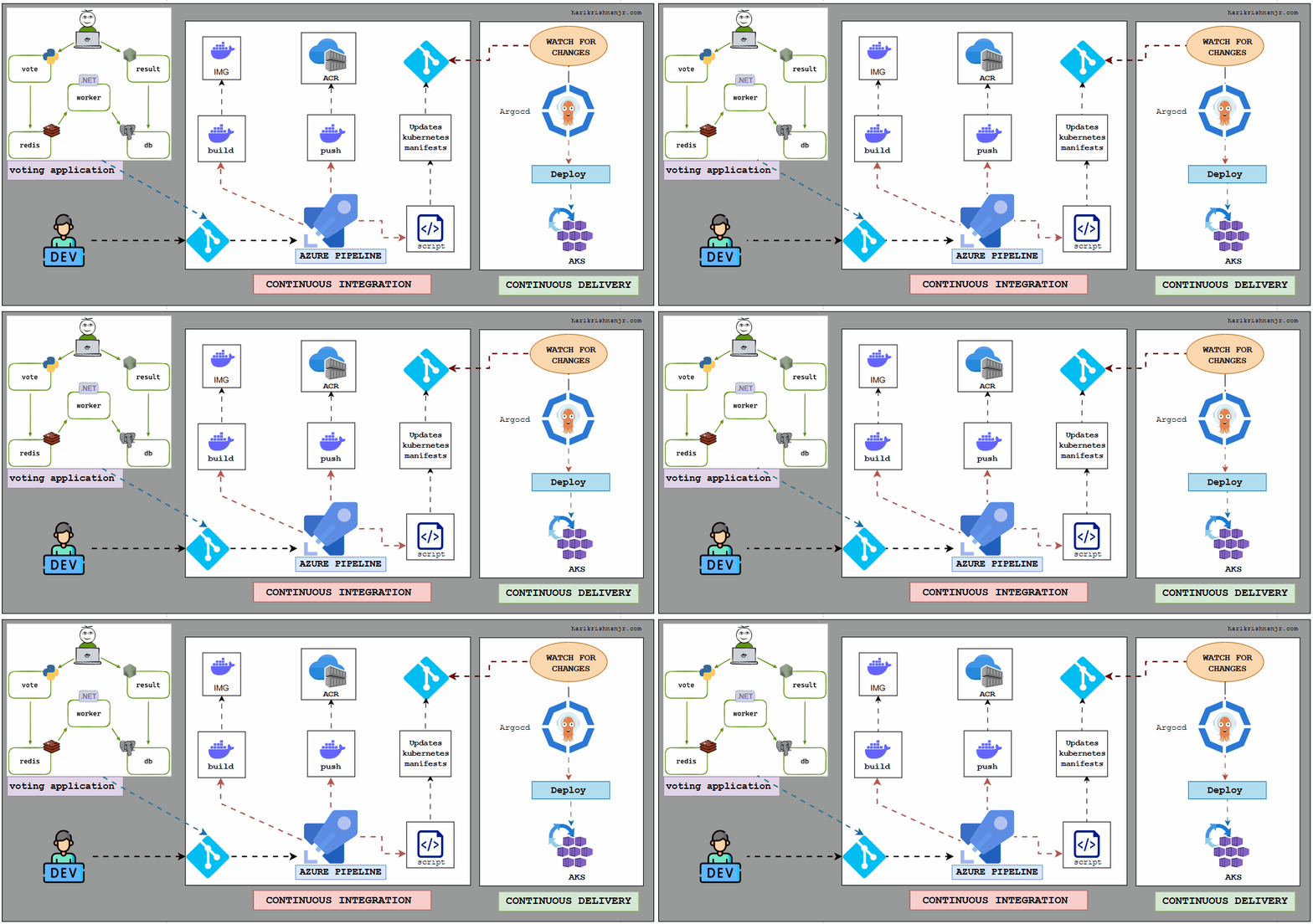 Complete End-to-End GitOps CI/CD Pipeline Architecture
This project follows a GitOps-based CI/CD architecture where:
- Developer pushes code to Git
- Azure DevOps builds Docker image
- Image is pushed to Azure Container Registry
- Kubernetes manifest is updated with new image tag
- ArgoCD detects Git changes
- ArgoCD deploys application to Kubernetes cluster
This ensures fully automated and controlled deployment.
System Architecture Explanation
The architecture is divided into two main parts:
Continuous Integration (CI)
Handles:
- Code build
- Docker image creation
- Image push
- Kubernetes manifest update
Continuous Delivery (CD)
Handles:
- Git monitoring
- Change detection
- Kubernetes deployment
- Application synchronization
This separation improves reliability and scalability.
Workflow Explanation (Start to End)
1️⃣ Developer Pushes Code
The process starts when a developer pushes code to the Git repository.
git push origin main
Azure DevOps pipeline is configured with a trigger that monitors repository changes.
So whenever code is pushed, the pipeline automatically starts.
This eliminates manual deployment.
2️⃣ Azure DevOps Builds Docker Image
The pipeline runs a Docker build stage.
It reads the Dockerfile and builds the container image.
Example:
votingapp:104
The tag is generated using:
Build.BuildId
This ensures every build has a unique version.
This avoids using "latest" tag and improves version control.
3️⃣ Image is Pushed to Azure Container Registry
After building the image, the pipeline pushes it to Azure Container Registry.
Example:
haricontaineregistry.azurecr.io/votingapp:104
Now the image is securely stored in the registry and ready for deployment.
ACR acts as a centralized container storage system.
4️⃣ Kubernetes Manifest is Updated
After pushing the image, the pipeline runs a shell script.
This script updates the Kubernetes deployment YAML file.
The image tag is replaced with the latest build tag.
Before:
image: haricontaineregistry.azurecr.io/votingapp:101
After:
image: haricontaineregistry.azurecr.io/votingapp:104
This ensures Kubernetes always deploys the latest image.
The updated manifest is then committed back to Git.
5️⃣ Updated Manifest is Pushed to Git
The pipeline pushes the updated Kubernetes YAML file to the repository.
git add .
git commit -m "Updated image tag"
git push
Now Git contains the latest deployment configuration.
This is the core idea of GitOps.
Git becomes the single source of truth.
6️⃣ ArgoCD Monitors Git Repository
ArgoCD continuously monitors the Git repository.
It checks:
Git state vs Kubernetes cluster state
ArgoCD runs a reconciliation loop every few minutes.
If it detects a new commit or configuration change, it triggers synchronization.
This automation removes manual deployment work.
7️⃣ ArgoCD Deploys to Kubernetes
Once ArgoCD detects the change, it synchronizes the application.
It updates the Kubernetes deployment with the new image.
Kubernetes then pulls the new image from ACR.
Pods are recreated with the updated version.
The application is deployed automatically.
This completes the GitOps pipeline.
Complete Flow Summary
Developer pushes code
        ↓
Azure DevOps pipeline triggers
        ↓
Docker image built
        ↓
Image pushed to ACR
        ↓
Kubernetes YAML updated
        ↓
Git updated
        ↓
ArgoCD detects change
        ↓
Kubernetes deployment updated
        ↓
Application runs
This creates a fully automated DevOps workflow.
Technical Concepts Used
CI/CD
- Automated pipeline execution
- Docker image build and push
- Multi-stage pipeline
GitOps
-
Git as source of truth
-
Declarative Kubernetes configuration
-
Automated sync
-
Deployment management
-
Container orchestration
-
Rolling updates
-
Continuous monitoring
-
Reconciliation loop
-
Automated deployment
Advantages of This Architecture
Automation
No manual deployment required.
Version Control
Every image has a unique tag.
Reliability
Git always contains the correct configuration.
Scalability
Works for microservices and large systems.
Fast Deployment
Changes are deployed automatically.
Real-World Use
This type of architecture is used in:
- Cloud-native companies
- Enterprise DevOps teams
- Fintech platforms
- SaaS products
- Microservices environments
GitOps and ArgoCD are becoming industry standards for Kubernetes deployments.
Conclusion
This project demonstrates a complete GitOps-based CI/CD pipeline using modern DevOps tools.
It automates the entire deployment process from code commit to Kubernetes deployment.
The combination of Azure DevOps, Docker, ACR, Kubernetes, and ArgoCD creates a powerful and reliable deployment workflow.
This approach ensures consistency, automation, and scalability in modern cloud environments.
Connect With Me
For a detailed project walkthrough, step-by-step implementation, and live demo, feel free to connect with me.
A complete project explanation video will be published soon.
Connect with me on LinkedIn and follow for more DevOps and Kubernetes projects.