Understanding Kubernetes Architecture
A beginner-friendly guide to how Kubernetes works — its components, structure, and the flow that keeps your apps alive.
What is Kubernetes?
Imagine you have 100 Docker containers to run. You need someone to decide where each one runs, restart them if they crash, balance traffic between them, and scale them up when traffic spikes. Doing that manually is a nightmare. That's exactly the problem Kubernetes solves.
Think of it like this: Kubernetes is like a smart shipping port. Your app containers are the cargo ships. Kubernetes is the port authority — it decides which dock (server) each ship goes to, watches for trouble, and reroutes things when something goes wrong.
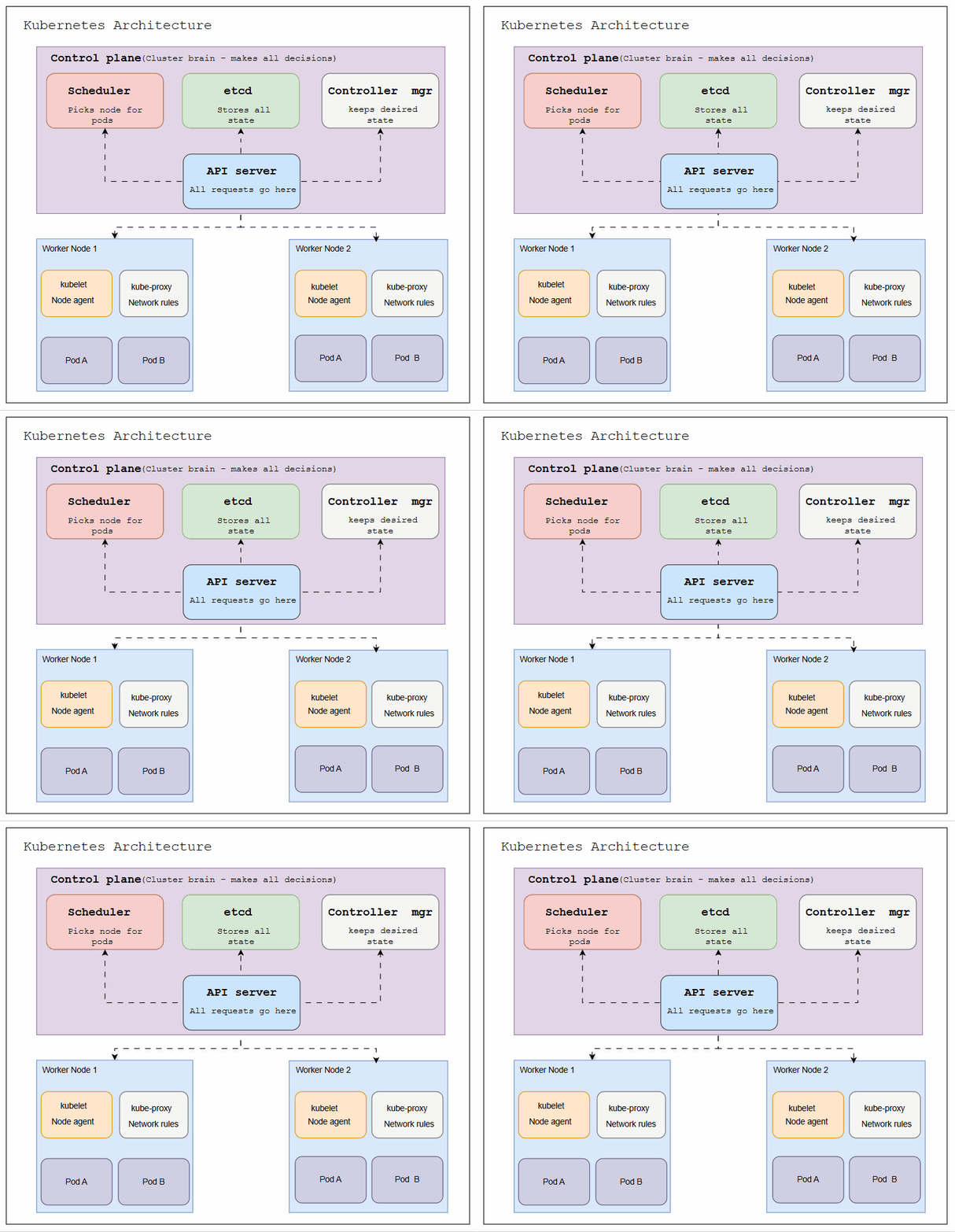
- Full Kubernetes Architecture — Control Plane + Worker Nodes*
The Big Picture
Kubernetes has two main zones that work together:
| Zone | Role |
|---|---|
| Control Plane | The "brain" of Kubernetes. Makes all decisions — scheduling, desired state, health checks. |
| Worker Nodes | The "muscles." They run your actual application containers (called Pods). |
You talk to the Control Plane, it manages the Worker Nodes, and the Worker Nodes run your app. Simple chain of command.
Control Plane Components
The Control Plane has 4 key pieces. Each one has a very specific job:
Scheduler
When a new Pod needs to run, the Scheduler picks the best Worker Node for it. It looks at CPU, memory, and rules you've set.
etcd
The cluster's memory. Stores everything — how many replicas you want, what's running, configurations. If Kubernetes forgets something, it checks etcd.
Controller Manager
Constantly watches the cluster. If you asked for 3 Pods and one crashes, the Controller Manager notices and creates a new one. It keeps the "desired state."
API Server
The front door. Every request — from kubectl, the Scheduler, or your CI/CD — goes through the API Server first. It's the central hub.
Easy analogy:
- API Server = receptionist
- Scheduler = HR who assigns desks
- etcd = company database
- Controller Manager = the manager who notices when someone's missing and hires a replacement
Worker Node Components
Every Worker Node has two agents running on it that help it communicate with and execute instructions from the Control Plane:
kubelet
The node's local agent. It receives instructions from the API Server and makes sure containers are actually running. It's the "on-the-ground worker."
kube-proxy
Handles all networking on the node. Makes sure traffic from outside (or other Pods) reaches the right container using network rules.
And inside each Worker Node, your apps run as Pods — the smallest unit in Kubernetes. A Pod is just one or more containers running together.
How It All Works — Step by Step
Let's say you deploy a new app. Here's exactly what happens inside Kubernetes:
** Request Flow — Deploying an App**
1 — You run kubectl apply
Your command hits the API Server. It validates the request and stores your desired state in etcd.
2 — Scheduler picks a node
The Scheduler sees a new Pod needs to run. It checks available nodes and picks the best one based on resources.
3 — kubelet gets the order
The API Server tells the kubelet on that Worker Node to start the Pod. kubelet pulls the container image and starts it.
4 — kube-proxy sets up networking
Network rules are created so traffic can reach your new Pod from inside or outside the cluster.
5 — Controller Manager watches forever
If your Pod crashes, the Controller Manager detects the mismatch between desired state (3 Pods) and actual state (2 Pods) and triggers a new one.
Key insight: Kubernetes works on the concept of "desired state vs actual state." You tell it what you want. It constantly works to match reality to your wish. If anything drifts, it self-heals automatically.
Quick Reference — All Components
| Component | Zone | What It Does |
|---|---|---|
| API Server | Control Plane | Central hub — all requests pass through here |
| etcd | Control Plane | Stores all cluster data and configuration |
| Scheduler | Control Plane | Assigns Pods to the right Worker Node |
| Controller Manager | Control Plane | Maintains desired state, self-heals the cluster |
| kubelet | Worker Node | Runs Pods, reports status to Control Plane |
| kube-proxy | Worker Node | Manages network rules and traffic routing |
| Pod | Worker Node | Smallest unit — runs one or more containers |
Wrapping Up
Kubernetes might look complex from the outside — and it is powerful — but the core idea is simple:
You describe what you want. The Control Plane figures out how to make it happen. The Worker Nodes do the actual work. And if anything breaks, Kubernetes heals itself automatically.
Once you understand these components and how they talk to each other, the rest of Kubernetes starts to make sense — Services, Ingress, ConfigMaps, Deployments — they all plug into this same architecture.
Next steps: Try running a local Kubernetes cluster with minikube or kind. Deploy a simple nginx Pod and watch the Scheduler, kubelet and Controller Manager do their jobs in real time using:
kubectl get pods -w