Zero-Downtime MongoDB Migration: 5.0 to 8.0 with Mongosync and Blue-Green Deployment
The problem, in one line: I needed to upgrade a production MongoDB cluster from version 5.0 to 8.0 — without taking the live application down. ## Wh…
The problem, in one line: I needed to upgrade a production MongoDB cluster from version 5.0 to 8.0 — without taking the live application down.
What is MongoDB, and why does the version matter?
MongoDB is a document database — instead of storing data in rigid rows and columns like a traditional SQL database, it stores flexible, JSON-like documents. This makes it a common choice for applications with data that doesn't fit neatly into fixed schemas, or that needs to scale horizontally across large datasets.
Like any database, MongoDB releases new major versions with performance improvements, storage engine upgrades, and security patches. MongoDB 5.0 reached end of support, which means it no longer receives security fixes — running it in production is an increasing liability the longer it's left in place. The fix seems obvious: upgrade. The hard part is doing that upgrade without taking a live application offline, especially with hundreds of gigabytes of data and continuous writes happening every second.
What is Mongosync, and Why Use It?
Mongosync is MongoDB's own tool for live, continuous data replication between two separate MongoDB clusters — including clusters running different major versions. Instead of taking a one-time backup and restoring it (which requires stopping writes to get a consistent snapshot), Mongosync connects to a running source cluster and a running destination cluster simultaneously, copies the existing data over, and then keeps replicating every new write in real time as it happens.
That's the property that matters here: because Mongosync runs continuously in the background against a live source, the source cluster never has to stop serving traffic for the sync to happen. It's built specifically for scenarios like major version upgrades, cloud migrations, and cluster consolidations, where the goal is to end up on a new cluster without a large offline window to get there. The rest of this post is essentially about how to put that property to use safely in production.
The Default Way to Upgrade MongoDB (and Where It Struggles)
MongoDB's standard, built-in upgrade path is an in-place rolling upgrade across a replica set — a group of MongoDB servers that replicate the same data for redundancy. The conventional process looks like this:
- Upgrade the MongoDB binaries on secondary members one at a time, letting each rejoin the replica set before moving to the next.
- Step down the primary (the server currently accepting writes) so a secondary takes over.
- Upgrade the former primary last.
- Raise the replica set's FCV (Feature Compatibility Version) — a setting that gates which new features are active, and one that's difficult to safely reverse once bumped.
This approach genuinely works well for minor version bumps and can often be done with minimal disruption. But it runs into real limits on a migration like this one:
- MongoDB doesn't support skipping major versions in-place, at all. A native FCV-based upgrade from 5.0 to 8.0 requires three sequential hops — 5.0 → 6.0, 6.0 → 7.0, then 7.0 → 8.0 — each with its own risk window, backup, and verification period.
- Every step down is a brief write interruption. Each primary election, while typically measured in seconds, is still a moment where the application can't write. Multiply that across every hop, every replica set member, and a large migration accumulates real risk.
- Raising the FCV is close to a one-way door. If something goes wrong after the compatibility version is raised, rolling back cleanly is difficult — which pressures teams into long, cautious verification windows before committing to each step.
- At hundreds of gigabytes of live data, the safety margin for something to go wrong during a rolling upgrade shrinks, and any mistake risks a maintenance window measured in hours, not minutes.
None of this makes the default approach wrong — it's the right call for smaller datasets or less strict uptime requirements. But for a production system that can't tolerate an extended pause, it wasn't good enough here. That's the actual problem this post solves: how to upgrade two major versions on a live, high-traffic cluster while keeping the downtime window down to minutes, not hours.
One more advantage worth calling out upfront: Mongosync isn't bound by the same one-major-version-at-a-time restriction as a native in-place upgrade, since it replicates data logically rather than performing a binary/FCV walk. That's what made it possible to go 5.0 → 7.0 directly, skipping the 6.0 hop entirely, before repeating the procedure once more for 7.0 → 8.0 — two migrations total instead of three.
The Blue-Green Migration Architecture
Instead of upgrading the existing cluster in place, this approach stands up a completely separate, already-upgraded cluster alongside the live one, uses Mongosync to keep them continuously in sync, and only switches traffic over once the new cluster is provably caught up. If anything looks wrong at that point, the original cluster is still there, untouched, ready to take traffic back immediately.
The piece that makes this work on the application side is a Blue-Green pod topology — a deployment pattern where two identical application environments exist side by side. One (Green) serves all live traffic; the other (Blue) is fully provisioned but idle, ready to take over the instant it's needed.
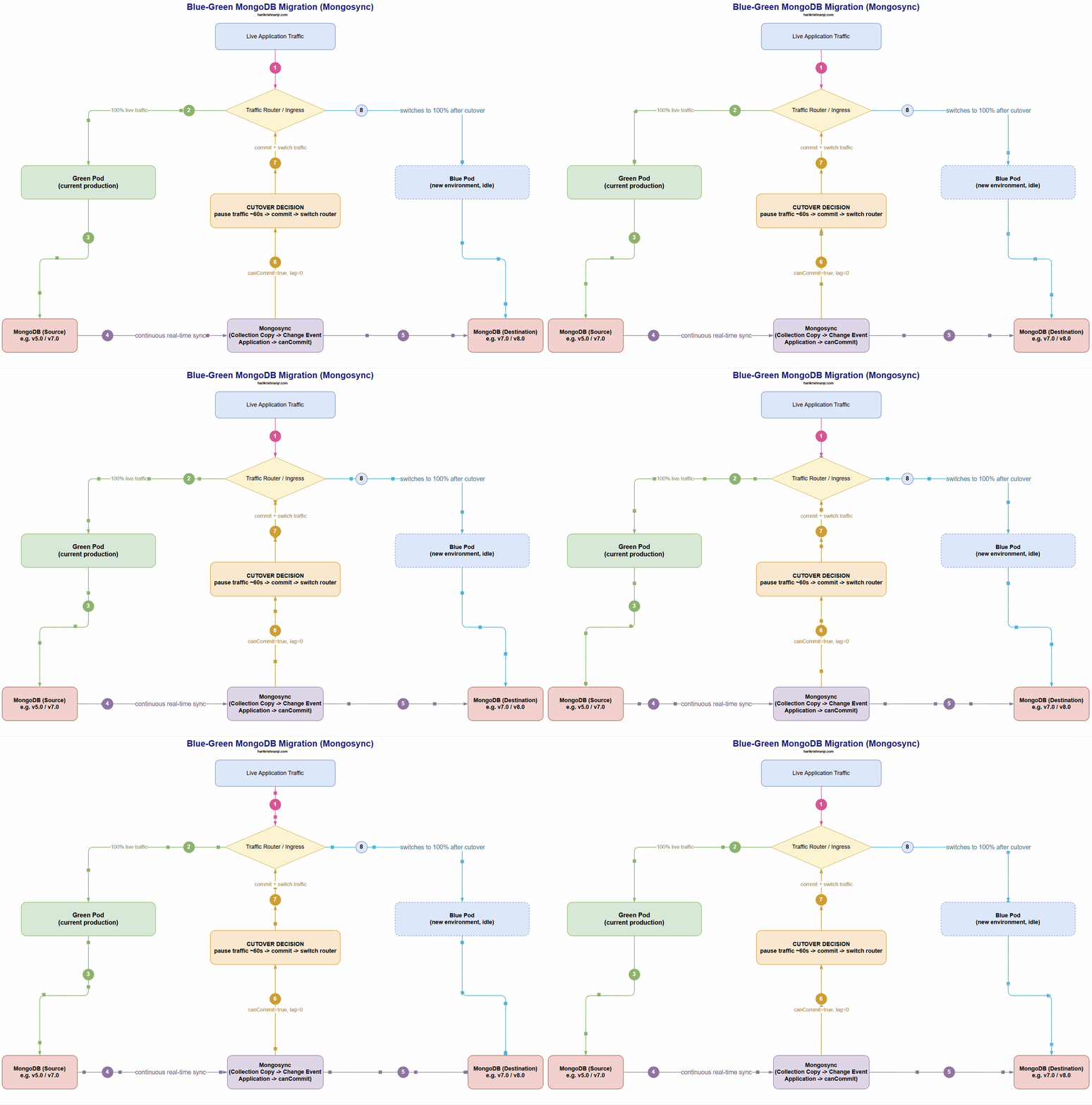 Live traffic flows through the Green Pod, connected to the source MongoDB cluster, while Mongosync continuously replicates every write to the destination cluster in the background. Once Mongosync's
 canCommit status confirms zero replication lag, the router switches traffic to the Blue Pod — now pointed at the fully upgraded destination.
Green Pod — the current production environment, connected to the source MongoDB version. It keeps serving 100% of live traffic for the entire migration, completely unaware anything is happening behind the scenes.
Blue Pod — a new environment, pre-deployed and configured to point at the destination MongoDB cluster (already running the upgraded version). It stays fully idle until cutover — no traffic reaches it until the switch is deliberately made.
This is the core mechanism that eliminates the downtime problem: the upgrade happens entirely in the background, on a second cluster, while the original keeps serving users normally. The only moment users are affected at all is the few minutes it takes to flip traffic from Green to Blue — not the hours it can take to safely complete a rolling in-place upgrade.
Key Terms Used Throughout This Migration
A few MongoDB-specific concepts come up repeatedly below — worth defining once, clearly, before diving into the steps:
- Oplog (operations log) — a special MongoDB collection that records every write operation in order. It's what replica sets use to stay in sync, and it's also what Mongosync reads from to know what changed on the source. If the oplog doesn't retain enough history, Mongosync can lose track of changes and be forced to restart the entire sync from scratch — which is why oplog window size (how much history it retains before overwriting) matters so much here.
- WiredTiger cache — MongoDB's default storage engine keeps a portion of the working data set in memory for performance. During a large bulk data copy, this cache fills up fast, which is why memory sizing and monitoring is a recurring theme below.
- Collection Copy phase — the first phase of a Mongosync migration: a full, one-time bulk copy of every existing document to the destination.
- Change Event Application (CEA) phase — the second phase: once the bulk copy finishes, Mongosync replays every write that happened on the source while the copy was running, so the destination catches up to the present moment.
canCommit— a status flag Mongosync exposes once the destination has fully caught up with zero replication lag. It's the final safety gate — cutover should never happen until this is true.
Migration Steps
1. Prepare the destination — wipe the destination cluster clean so Mongosync starts from an empty state, avoiding stale data from earlier test runs.
2. Start Mongosync — deployed a plain Ubuntu container as a pod in the cluster, then installed and started Mongosync inside it as a background process. Running it this way keeps it isolated from the application pods, gives full control over the binary version and resource limits, and makes it easy to tear down cleanly once the migration is done. Once running, it connects to both source and destination clusters and confirms reachability on both sides before any data movement begins.
3. Begin data sync (Collection Copy phase) — Mongosync bulk-copies all existing documents across every collection to the destination. The application keeps writing to the source the entire time; users see no impact.
4. Monitor Collection Copy — every 30 minutes, track write latency, ops/sec, oplog lag, and memory usage.
5. Monitor memory — the destination's WiredTiger cache is memory-hungry during bulk copy.
6. Monitor oplog windows — both source and destination oplogs need enough retained history for Mongosync to keep syncing.
7. Change Event Application (CEA) phase — once the bulk copy finishes, Mongosync replays every write that happened on the source during the copy, bringing the destination fully current.
8. Wait for canCommit — this is the final safety gate described above; nothing proceeds until it's
true.
9. Pre-commit document count verification — before committing, verify document counts on both dbs.
Cutover
This is the only part of the entire migration where users are affected at all — and it's designed to be as short and reversible as possible right up until step 3.
- Pause incoming traffic to the Green Pod for roughly 60 seconds to guarantee no writes land during the switch.
- Confirm replication lag is zero.
- Commit Mongosync — this is the point of no return. The destination is unlocked for writes and Mongosync stops syncing.
- Verify the Blue Pod's credentials point at the correct destination cluster.
- Switch traffic from Green to Blue. The application resumes serving users, now on the new MongoDB version.
Total cutover window: 3–5 minutes — compared to the hours-long risk window a traditional in-place rolling upgrade can carry across two major-version hops.
Post-Cutover Verification
- First 30 minutes: active monitoring of health check endpoints, application logs, and one final document-count check.
- 24 hours: deeper review of memory, CPU, error rates, and background jobs.
- 48–72 hours: after confirmed stability, the old cluster and Green Pod are decommissioned.
Rollback Strategy
The rollback plan differs depending on when an issue surfaces — and this is where the Blue-Green approach pays for itself: rollback isn't a restore from backup, it's just switching traffic back.
- Before commit: pause the migration. The application keeps running unaffected on the source — no data loss, no rollback needed, because traffic never left the source.
- After commit: switch traffic back to the Green Pod immediately, which is still running on the source version. The source cluster is deliberately kept alive for a minimum of 72 hours post-cutover specifically as this safety net. The rollback decision window is capped at 30 minutes post-cutover to limit data reconciliation effort.
Result
Total migration time, start to finish: 4–5 hours, with an actual user-facing pause of about 1 minutes at cutover — versus the hours-long risk window a traditional in-place rolling upgrade carries across two major-version hops. The same procedure was repeated for the second hop (7.0 → 8.0), confirming the approach is repeatable across major version boundaries. That repeatability is really the point: this isn't a one-off script, it's a reusable playbook for any major MongoDB upgrade on a live system where downtime isn't an option.