How SSH Actually Works: From TCP Handshake to Encrypted Shell
What really happens between typing `ssh user@host` and getting a shell: version exchange, key exchange, host verification, authentication, and encrypted channels, explained step by step.
Why This Is Worth Understanding
If you work in DevOps or cloud infrastructure, you type ssh user@host dozens of times a day. It just works, so most of us never look underneath. But the moment something breaks (a Host key verification failed error, a Permission denied (publickey), a jump host that refuses to forward) you are debugging a protocol you have never really studied.
SSH (Secure Shell) is more than "a remote terminal." It is a layered protocol that gives you three guarantees over an untrusted network:
- Confidentiality: nobody on the wire can read your session
- Integrity: nobody can tamper with the data without being detected
- Authentication: you know you are talking to the right server, and the server knows who you are
Here is how each of those is achieved, in the order it happens.
The Big Picture
SSH-2 (the only version you should be using) is built from three layers:
- Transport layer: negotiates algorithms, exchanges keys, authenticates the server, and sets up encryption and integrity checks
- User authentication layer: authenticates the client (you) to the server
- Connection layer: multiplexes multiple logical channels (shell, command execution, port forwarding, file transfer) over the single encrypted connection
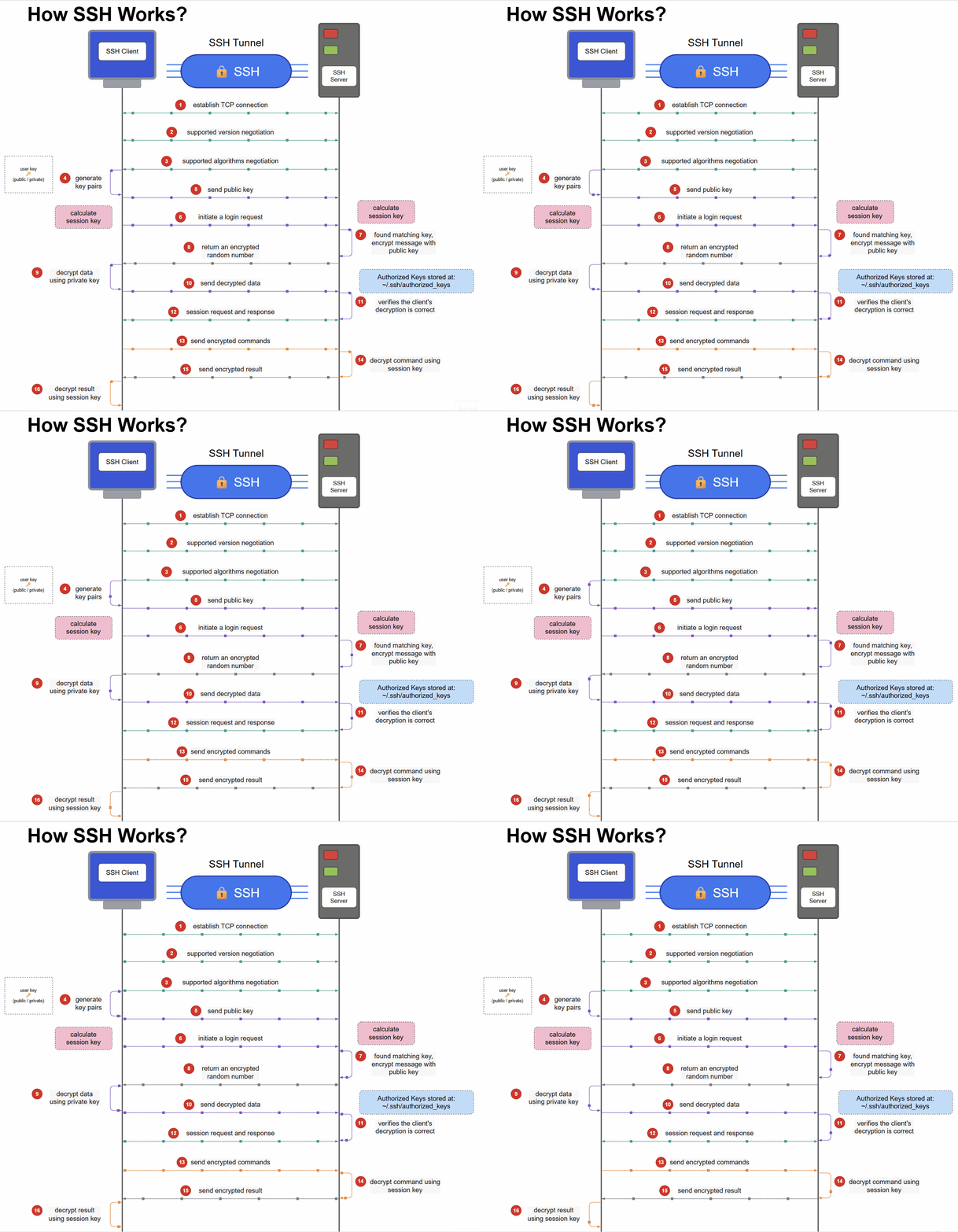 The full flow, animated: each moving dot is traffic in flight. Everything after step 4 travels inside the encrypted tunnel.
Step 1: TCP Connection and Version Exchange
SSH runs over plain TCP, by default on port 22. Once the connection is established, both sides immediately send a banner announcing the protocol version and software, something like SSH-2.0-OpenSSH_9.6.
This is the only part of the conversation that is fully in the clear, and it is intentionally boring. It simply confirms both ends speak the same protocol.
Step 2: Algorithm Negotiation
Next, each side sends a KEXINIT message listing what it supports, in order of preference:
- Key exchange algorithms (e.g.
curve25519-sha256) - Host key algorithms (e.g.
ssh-ed25519,rsa-sha2-512) - Ciphers for bulk encryption (e.g.
chacha20-poly1305@openssh.com,aes256-gcm@openssh.com) - MAC algorithms for integrity (when the cipher doesn't provide it built-in)
- Compression options
The client's preference order generally wins, as long as the server supports the option. If there is no overlap, the connection fails, which is why very old clients talking to hardened servers (or the reverse) throw errors like no matching key exchange method found. You can see the full list your client offers with ssh -Q kex, ssh -Q cipher, and so on.
Step 3: Key Exchange: Agreeing on a Secret in Public
This is the clever part. The client and server need a shared secret key, but they are talking over a network where anyone can listen. How do two parties agree on a secret without ever sending it?
SSH uses a Diffie-Hellman style key exchange (in modern setups, elliptic-curve Diffie-Hellman using Curve25519):
- Each side generates a temporary (ephemeral) private value and derives a matching public value from it
- They exchange only the public values
- Each side combines its own private value with the other's public value
- Both arrive at the same shared secret, which never crossed the wire
An eavesdropper sees both public values but cannot feasibly compute the shared secret from them. From this secret and a hash of the exchange, both sides derive the session keys used for encryption and integrity.
Because the values are ephemeral and discarded afterward, SSH has forward secrecy: even if someone later steals the server's long-term key, they cannot decrypt a recorded session from the past.
Step 4: Server Authentication: Am I Talking to the Right Machine?
Key exchange alone has a gap: you could be doing a perfectly secure key exchange with an attacker sitting in the middle. So the server proves its identity:
- During the exchange, the server sends its host public key
- It also sends a signature over the exchange hash, made with its host private key
- The client verifies the signature, proving the server holds the matching private key
But how does the client know that host key belongs to the machine it intended to reach? That is what ~/.ssh/known_hosts is for.
The first time you connect to a new host, you see:
The authenticity of host 'example.com (203.0.113.10)' can't be established.
ED25519 key fingerprint is SHA256:...
Are you sure you want to continue connecting (yes/no)?
This is trust on first use (TOFU). If you accept, the key is stored. On every later connection, SSH compares the presented key against the stored one. If it changes, you get the famous warning:
WARNING: REMOTE HOST IDENTIFICATION HAS CHANGED!
Sometimes that is legitimate (the server was rebuilt, or an IP was reassigned to a new VM, which is very common in cloud environments). Sometimes it is a man-in-the-middle attack. The point is that SSH makes you notice. Don't reflexively delete the line from known_hosts without asking why it changed.
After this step, both sides send NEWKEYS, and everything from here on is encrypted and integrity-protected.
Step 5: User Authentication: Proving Who You Are
Now the server needs to know who you are. This happens inside the already-encrypted tunnel. Common methods:
- Password: the password is sent through the encrypted channel. Simple, but weak against brute force and credential reuse.
- Public key: the recommended method.
- Keyboard-interactive: used for MFA prompts and one-time codes.
How public-key authentication works
You generate a key pair:
ssh-keygen -t ed25519 -C "you@example.com"
The public key goes into the server's ~/.ssh/authorized_keys. The private key stays on your machine and is never transmitted.
At login:
- The client tells the server which public key it wants to use
- If that key is in
authorized_keys, the server accepts the offer and expects proof - The client signs a blob of data that includes the unique session ID with its private key
- The server verifies the signature using the public key
Because the signed data includes the session ID, a captured signature is useless in any other session. You proved you hold the private key without ever revealing it. This is why key-based auth is both more convenient and significantly more secure than passwords.
Step 6: The Connection Layer: Channels
Once authenticated, SSH doesn't just give you "a shell." It gives you a multiplexed connection that can carry many independent channels at the same time. Each channel has its own purpose:
- Session channel: an interactive shell, or a single remote command (
ssh host uptime) - Port forwarding channels: local (
-L), remote (-R), and dynamic SOCKS (-D) tunnels - Subsystems: most notably SFTP, which is why
sftpandscpneed nothing but an SSH server - Agent forwarding and X11 forwarding, if enabled
This is why a single SSH connection can carry your shell, a database tunnel, and a file transfer at once, and why tools like Ansible, Git, and rsync can ride on top of SSH so easily. Under the hood they are just opening channels.
Practical Tips That Fall Out of This
Knowing the mechanics makes the everyday habits make sense:
-
Debug with
-v.ssh -vvv user@hostprints each stage above: banner, algorithm negotiation, host key check, which keys were offered, and which auth method succeeded. Most "SSH is broken" issues become obvious in the verbose output. -
Use
~/.ssh/configinstead of long commands:Host prod-bastion HostName 203.0.113.10 User deploy IdentityFile ~/.ssh/id_ed25519 Host prod-app-* ProxyJump prod-bastionProxyJumpsimply chains SSH connections through the bastion, with the inner session still end-to-end encrypted. -
Prefer Ed25519 keys over older RSA for new keys: smaller, faster, and strong by default.
-
Protect private keys with a passphrase and use
ssh-agentso you only unlock it once. -
Harden the server. In
/etc/ssh/sshd_config, considerPasswordAuthentication no,PermitRootLogin no, and restricting users withAllowUsers. Reloadsshdand keep an existing session open while you test. -
Verify fingerprints out-of-band for sensitive hosts the first time you connect, rather than blindly typing
yes.
Key Takeaways
- SSH is three protocols stacked together: transport (encryption and server identity), user authentication, and the connection layer (channels). Each solves a different problem.
- The shared secret is never sent. Diffie-Hellman lets both sides derive it independently, and ephemeral keys give you forward secrecy.
- Host keys protect you from the server side being faked; user keys protect the server from the client side being faked. Treat a changed host key warning as information, not an annoyance.
- Public-key auth proves possession without disclosure. The private key never leaves your machine, and each signature is bound to a single session.
- A shell is just one channel. Once you see SSH as a secure multiplexed pipe, tunnels, jump hosts, SFTP, and tools like Git-over-SSH all become straightforward applications of the same mechanism.