Three-Tier Architecture Deployment on Azure AKS
A complete hands-on walkthrough of deploying Stan's Robot Shop — a polyglot microservices application — on Azure Kubernetes Service using Helm, Ingress, and Azure Application Gateway.
Introduction
Understanding Kubernetes from documentation is one thing. Actually deploying a real, multi-service application — wiring up ingress, managing stateful databases, and exposing it to the internet — is something else entirely.
In this project, I deployed Stan's Robot Shop, a polyglot microservices application, on Azure Kubernetes Service (AKS) following a classic three-tier architecture. The goal was not just to get pods running, but to understand every layer: networking, storage, service discovery, and observability.
This is not a hello-world. It is a controlled sandbox that mirrors what production deployments actually look like.
Project Overview
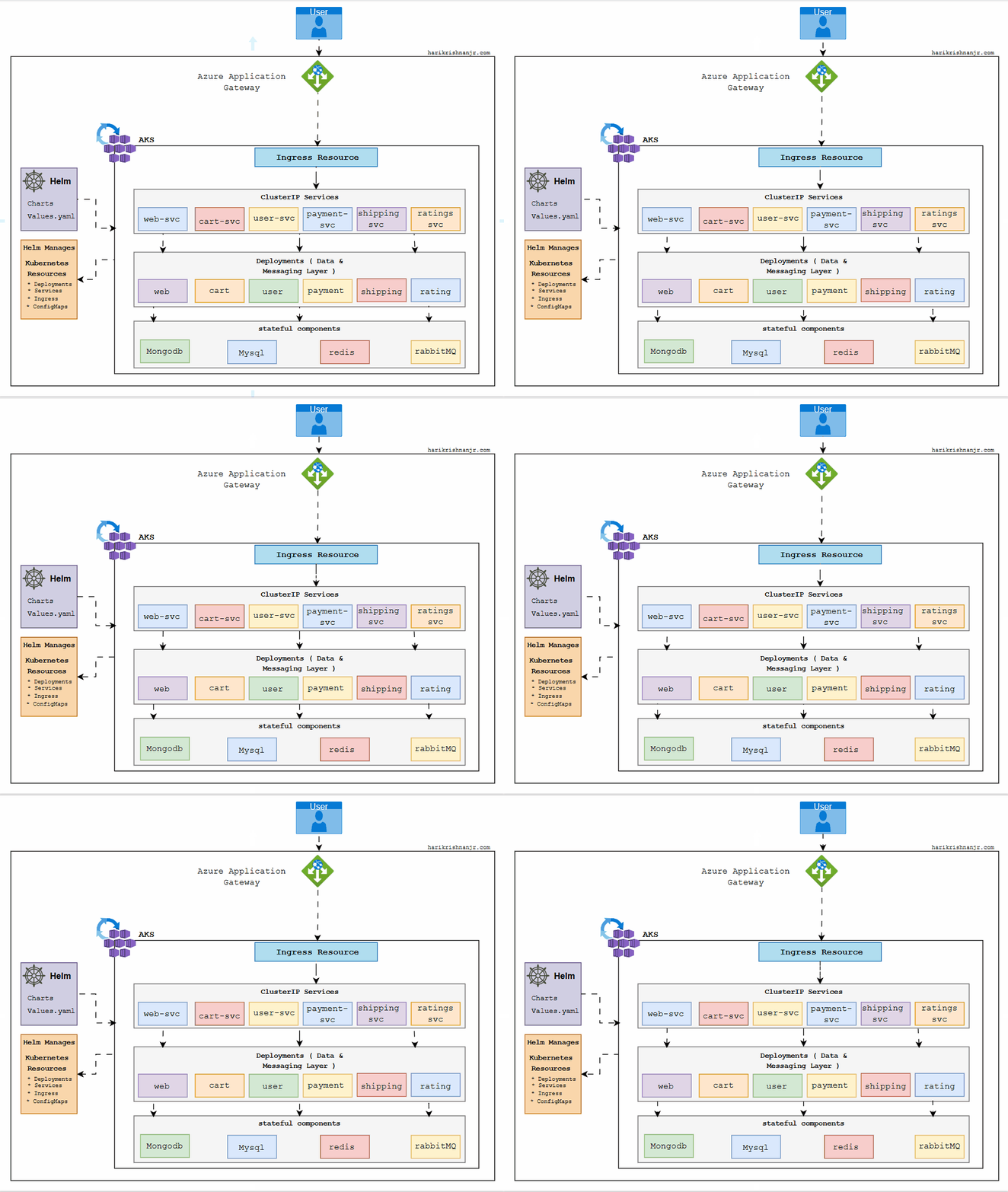 Full architecture — user traffic flows from Azure Application Gateway → Ingress → ClusterIP Services → Deployments → Stateful backends
The project is built around three distinct tiers:
- Presentation tier — AngularJS frontend exposed through an Ingress resource backed by Azure Application Gateway
- Application tier — six independent microservices (cart, user, payment, shipping, ratings, catalogue) each running as its own Kubernetes Deployment
- Data tier — MongoDB, MySQL, Redis, and RabbitMQ deployed as stateful components with persistent storage
Everything is packaged and deployed using Helm, which manages all Kubernetes resources — Deployments, Services, Ingress, and ConfigMaps — as a single versioned release.
Tech Stack
The application is deliberately polyglot, just like real production systems:
| Service | Language / Runtime |
|---|---|
| Web frontend | AngularJS |
| Cart | Node.js (Express) |
| User | Node.js (Express) |
| Catalogue | Node.js (Express) |
| Payment | Python (Flask) |
| Shipping | Java (Spring Boot) |
| Ratings | PHP (Apache) |
| Dispatch | Golang |
| Database | MongoDB, MySQL |
| Cache | Redis |
| Messaging | RabbitMQ |
Container images abstract the runtime differences — but startup times, health check paths, and port conventions still differ per service. Working through that is part of the learning.
Architecture — Three Tiers Explained
Tier 1 — Presentation Layer
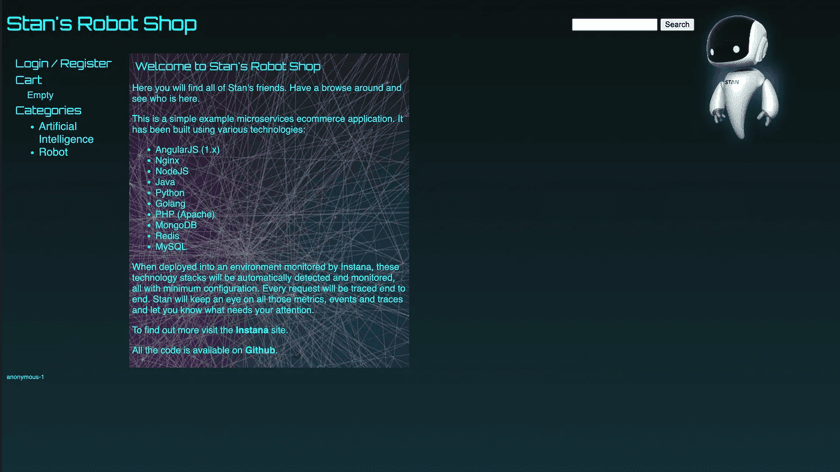
The web service runs an AngularJS single-page application and is the only service exposed externally. Traffic flows:
User → Azure Application Gateway → Ingress Resource → web-svc (ClusterIP) → web pod
The Ingress resource handles path-based routing — /api/* goes to the appropriate backend service, everything else hits the frontend.
Tier 2 — Application Layer
Each microservice runs as an independent Deployment with its own ClusterIP Service. Services communicate with each other using Kubernetes internal DNS:
http://cart:8080
http://user:8080
http://payment:8080
No service is exposed outside the cluster. All external access is funnelled through the Ingress.
Tier 3 — Data Layer
Stateful components use StatefulSets rather than Deployments. Each pod gets a stable network identity and its own persistent volume — critical for databases that must survive pod restarts without data loss.
mongodb    → port 27017
mysql      → port 3306
redis      → port 6379
rabbitmq   → ports 5672, 15672, 4369
Step-by-Step Deployment
1. Provision the AKS Cluster
Create the AKS cluster from the Azure CLI. Key decisions at this stage are node pool sizing and enabling the AGIC (Application Gateway Ingress Controller) add-on:
az aks create \
  --resource-group <rg-name> \
  --name <cluster-name> \
  --node-count 2 \
  --node-vm-size Standard_DS2_v2 \
  --enable-addons ingress-appgw \
  --appgw-name <appgw-name> \
  --appgw-subnet-cidr "10.225.0.0/16" \
  --generate-ssh-keys
Then fetch credentials for kubectl:
az aks get-credentials --resource-group <rg-name> --name <cluster-name>
2. Deploy with Helm
The entire application — all Deployments, Services, Ingress rules, and ConfigMaps — is packaged in a single Helm chart. All container images are pre-built and publicly available on Docker Hub, so there is no need to build anything manually. Helm pulls them automatically during deployment.
One command installs everything:
helm install robot-shop K8s/helm/ \
  --namespace robot-shop \
  --create-namespace
Watch pods come up:
kubectl get pods -n robot-shop
A healthy deployment looks like this — all 11 pods Running, zero restarts:
NAME                             READY   STATUS    RESTARTS   AGE
cart-67c7476467-kvblh            1/1     Running   0          35h
catalogue-7898454858-9z65m       1/1     Running   0          35h
dispatch-54f7f47d5d-wjs4s        1/1     Running   0          35h
mongodb-84bdfd8cd6-r8tfh         1/1     Running   0          35h
mysql-74f87f9fc8-9pvkg           1/1     Running   0          35h
payment-5d8cd6f594-22wgx         1/1     Running   0          35h
rabbitmq-7f4fb78bb8-hlq4b        1/1     Running   0          35h
ratings-d5b7d45c-wwb9s           1/1     Running   0          35h
redis-0                          1/1     Running   0          35h
shipping-f4d9b999-l9n52          1/1     Running   0          35h
user-8449b7664b-9tl5n            1/1     Running   0          35h
web-c4f7b4487-f7q6w              1/1     Running   0          35h
3. Verify Services and Ingress
Check that all services are correctly registered and the Ingress has an external IP:
kubectl get svc -n robot-shop
kubectl get ingress -n robot-shop
Expected output:
NAME        TYPE           CLUSTER-IP      EXTERNAL-IP      PORT(S)
cart        ClusterIP      10.0.197.186    <none>           8080/TCP
catalogue   ClusterIP      10.0.41.134     <none>           8080/TCP
mongodb     ClusterIP      10.0.143.13     <none>           27017/TCP
mysql       ClusterIP      10.0.237.15     <none>           3306/TCP
payment     ClusterIP      10.0.239.110    <none>           8080/TCP
rabbitmq    ClusterIP      10.0.21.162     <none>           5672/TCP
redis       ClusterIP      10.0.163.165    <none>           6379/TCP
shipping    ClusterIP      10.0.48.173     <none>           8080/TCP
user        ClusterIP      10.0.153.40     <none>           8080/TCP
web         LoadBalancer   10.0.84.67      20.219.232.118   8080:31909/TCP

NAME          CLASS                    HOSTS   ADDRESS         PORTS   AGE
robot-shop    azure-application-gateway  *     20.204.212.32   80      34h
The Ingress address — 20.204.212.32 — is the public entry point. Open it in a browser and the Robot Shop storefront loads.
What You Actually Learn From This Project
Kubernetes networking becomes tangible
ClusterIP Services give every pod a stable internal DNS name. The Ingress sits above them to route external HTTP traffic. You stop thinking of these as abstract concepts and start reading them as plumbing.
Why Helm exists
Managing 12+ raw YAML manifests by hand is painful and error-prone. Helm packages them into a single parameterised release — one command to install, upgrade, or roll back the entire application.
Deployments vs StatefulSets
Stateless services (web, cart, user) use Deployments — pods are interchangeable. Databases (MongoDB, MySQL) use StatefulSets — each pod has a stable identity and its own persistent volume. Getting this distinction wrong means data loss on restart.
Azure Application Gateway Ingress Controller (AGIC)
Provisioning AGIC, watching it read the Ingress spec, and seeing the Application Gateway appear in the Azure portal demystifies a layer that most tutorials treat as a checkbox. You understand exactly how external traffic enters the cluster.
Polyglot services in a single cluster
Node, Java, Python, Go, PHP — all running side by side. Container images abstract the runtime, but health check paths, startup times, and port conventions still differ per service. This is what real production looks like.
Complete Flow Summary
AKS cluster provisioned
        ↓
AGIC add-on enabled → Application Gateway created
        ↓
Helm installs all Kubernetes resources
(container images pulled automatically from Docker Hub)
        ↓
Pods reach Running state
        ↓
Ingress routes external traffic → web frontend
        ↓
Frontend calls backend services via internal DNS
        ↓
Backend services read/write to stateful layer
        ↓
Application live at public IP
Takeaway
This project covers every layer of a real Kubernetes deployment — image builds, cluster provisioning, Helm packaging, Ingress routing, stateful storage, and observability — in a single coherent system.
After completing it, Kubernetes stops feeling like a collection of YAML files and starts feeling like infrastructure you genuinely understand.
If you are working through it yourself, take time to break things intentionally. Delete a pod. Point the Ingress at the wrong service. Corrupt a ConfigMap. The fastest way to understand a system is to watch it fail and then fix it.
Resources
- GitHub Repo: three-tier-architecture-demo
- YouTube Walkthrough: youtu.be/akNSPKX0uIA
- AKS Documentation: docs.microsoft.com/azure/aks
- Helm Documentation: helm.sh/docs
Connect With Me
For a detailed project walkthrough, step-by-step implementation, and live demo, feel free to connect with me.
Connect with me on LinkedIn and follow for more DevOps and Kubernetes projects.