What Are Virtual Machines, and Why Do They Matter More in the AI Era?
What a virtual machine is, how it works, the benefits and common uses of VMs, and where they are heading with AI, edge computing and hybrid cloud.
What is a Virtual Machine?
A virtual machine is a software-based computer running its own OS and apps on physical servers.
Virtual machine defined
A virtual machine emulates a physical computer, running its own operating system and apps with virtualized resources. It’s isolated from the host system, allowing users to perform secure tasks like testing apps or using different operating systems while optimizing physical hardware.
Key takeaways
- Virtual machines behave like an actual computer running on a separate environment or operating system (OS).
- VMs can offer better resource deployment, isolation of applications, and enhanced security.
- VMs can also drive innovation, allowing seamless integration with emerging technologies like AI and edge computing.
How it works
How does a virtual machine work?
Virtualization is a complex process through which a software-based, or virtual version of a computer is created. This virtual machinery is allocated specific portions of CPU, memory, and storage from a physical host computer, such as your personal device or a remote server located in a cloud provider's datacenter.
A VM is a computer file, often referred to as an image, that functions like a physical computer. It operates in a window as an independent computing environment, often to run a different OS or act as the user's entire computer experience. The VM is also isolated from the rest of the system, which means that the software within the VM can’t interfere with the host computer's primary OS.
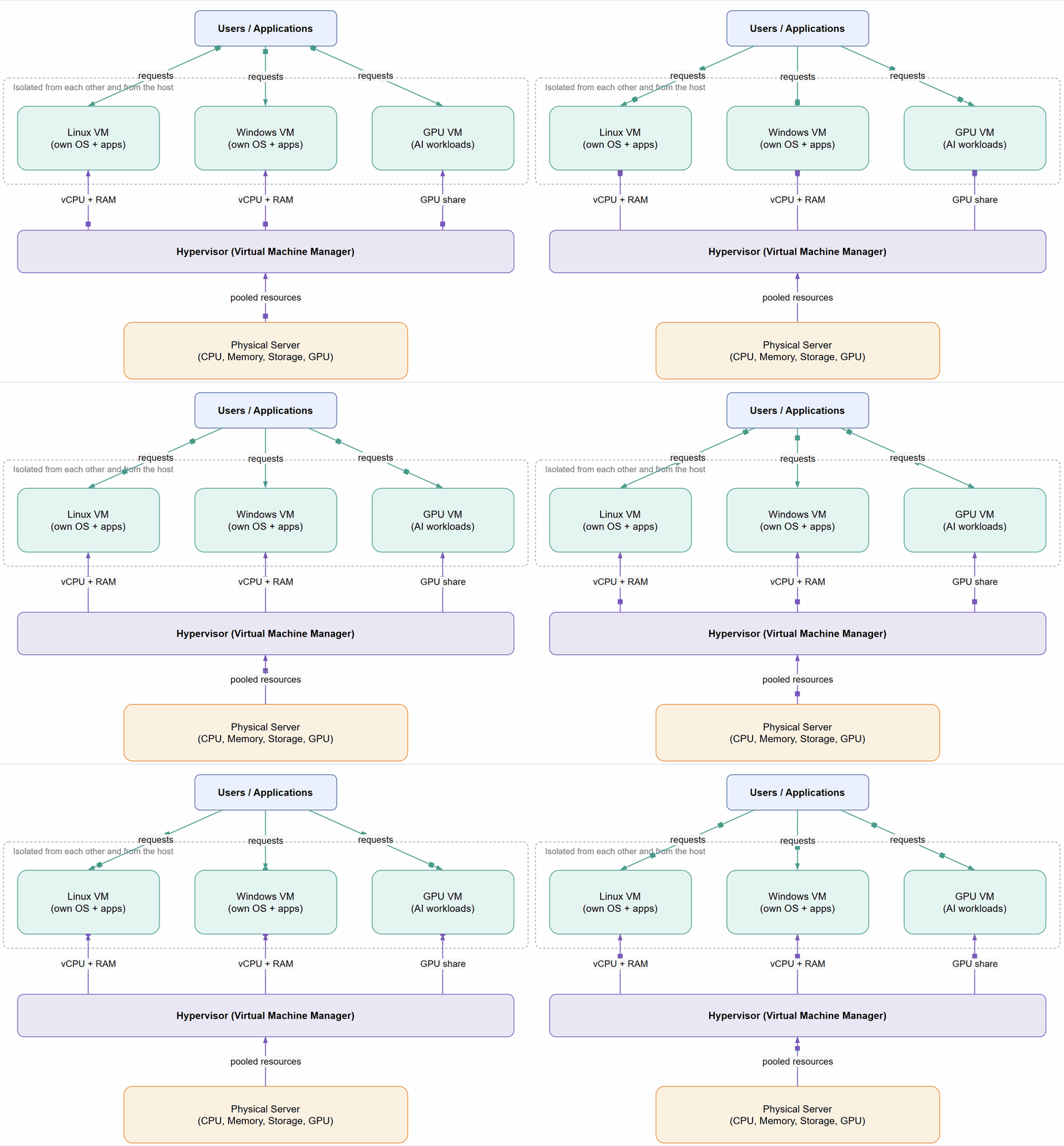 One physical server, one hypervisor, many isolated VMs. Each moving dot is a request or a resource flowing through the stack.
Benefits
What benefits do VMs offer?
VMs operate as separate computers with their own operating systems and applications, maintaining independence from each other and the physical host machine. A hypervisor, also known as a virtual machine manager, allows for the simultaneous operation of different operating systems on various VMs. This allows for the use of Linux VMs on a Windows OS or running an older version of Windows alongside a current Windows OS.
Since VMs are independent of each other, they're also extremely portable. You can quickly move a VM from one hypervisor to another on a different machine.
Virtual machines offer flexibility and portability, providing benefits such as:
- Cost savings—Using multiple virtual environments on a single infrastructure reduces the physical footprint, lowering server maintenance and electricity costs.
- Agility and speed—Creating a new VM is faster and easier than setting up a new environment for developers.
- Reduced downtime—VMs can be easily moved between hypervisors, making them ideal for backup if the host fails.
- Scalability—VMs simplify app scaling by adding physical or virtual servers, improving app availability and performance.
- Security—VMs can run multiple operating systems, allowing you to use a guest OS for insecure apps, thereby protecting your host OS. They enhance security and can isolate viruses, making them useful for safely studying malware.
What are VMs used for
Software development and testing
Developers use VMs to create isolated environments for testing new software without affecting their primary systems. This allows them to test different operating systems and configurations with ease.
Education and training
Colleges and institutions often use VMs to provide students with access to various software and operating systems without needing multiple physical machines, which is particularly useful for IT and computer science courses.
Cloud computing
Businesses use VMs to run applications and services in the cloud. This allows for scalable and flexible resource management, as VMs can be easily created, modified, and deleted as needed.
Disaster recovery
Businesses can create backups of virtual machines to quickly restore their systems in case of hardware failure or other disasters.
Server consolidation
Organizations utilize virtual machines to combine multiple server workloads onto fewer physical machines, which reduces hardware expenses and enhances resource usage.
Running legacy applications
VMs allow businesses to run older applications that might not be compatible with newer operating systems. This helps in maintaining continuity without the need for outdated hardware.
Why Virtual Machines Matter More in the AI Era
Everything above explains what a VM is. AI is what makes those properties (isolation, portability and on-demand resources) matter more than before. Training and running models needs expensive hardware, large and sensitive datasets, and infrastructure that can be created and destroyed quickly. VMs are the layer that makes that practical.
GPUs are delivered through VMs
AI workloads depend on GPUs, and in the cloud those GPUs are almost always attached to virtual machines. Providers offer GPU-enabled VM sizes (for example Azure's NC and ND series) that give a single VM one or more full GPUs for training and inference. A GPU can also be shared between VMs using GPU partitioning, so a small inference job doesn't have to occupy an entire card. Either way, the VM is how you rent, size and release this hardware.
Isolation for expensive and sensitive workloads
AI teams work with proprietary models and datasets that can include customer data. Because a VM has its own operating system and a hard boundary from the host and from other VMs, it is a strong way to separate one team, customer or project from another on shared physical servers. This is the same isolation described earlier, applied to workloads where a leak or a noisy neighbour is far more costly.
VMs are the foundation under containers and Kubernetes
Most AI platforms run models in containers orchestrated by Kubernetes, but those containers still run on VMs. In a managed service like AKS, the worker nodes are VMs, and a GPU node pool is simply a group of GPU-enabled VMs. So VMs and containers are not competing choices. Containers package and scale the application, and VMs provide the isolated, right-sized machines underneath. This is the coexistence mentioned under future trends.
Elastic capacity and cost control
GPU capacity is expensive, and AI demand is spiky: heavy during a training run, light afterwards. Since VMs can be created, resized and deleted on demand, teams can spin up GPU machines for a job and release them when it finishes, instead of paying for idle hardware. Autoscaling node pools, scheduled shutdowns and spot or low-priority capacity all rely on this.
Repeatable environments
AI stacks are fragile: specific GPU drivers, CUDA versions, libraries and frameworks have to line up. A VM image captures a working environment, so the same setup can be reproduced across machines, regions and teams, and rolled back if an update breaks something.
Data protection and compliance
When models handle regulated or confidential data, organisations need to control where it runs and who can reach it. VMs fit into private networks, access controls and existing compliance processes, and some platforms offer confidential computing VMs that keep data protected even while it is being processed.
VMs and containers: choosing between them
- Use VMs when you need strong isolation, a full operating system, custom drivers or kernel settings, or dedicated GPUs for a long-running job.
- Use containers when you need fast startup, dense packing of many small services, and easy scaling of the application layer.
- Use both for most real AI platforms: containers on top of GPU-enabled VMs.
Future trends
What are future VM trends?
VMs are poised to be transformative, driven by advances in AI and other emerging technologies:
- Integration with AI—AI is revolutionizing VM technology by optimizing resource allocation, enhancing security, and automating management tasks. AI-powered VMs can predict workload demands, dynamically adjust resources, and identify potential security threats, making systems more efficient and secure.
- Edge computing—This technology processes data closer to the source, such as internet of things (IoT) devices, to reduce latency and bandwidth usage. As edge computing gains traction, VMs will play a crucial role in processing data, allowing for real-time analytics and faster decision-making for applications like autonomous vehicles and smart cities.
- Hybrid cloud solutions—VMs can be used seamlessly across on-premises, private, and public clouds. This hybrid approach allows businesses to optimize costs, performance, and scalability.
- Enhanced security—VMs will continue to evolve with advanced security features, such as AI-powered threat detection and response, which ensures that applications and data remain protected from cyber threats.
- Containerization—VMs will increasingly coexist with containers, providing a flexible and scalable environment for deploying applications. This hybrid approach allows businesses to run legacy applications alongside modern, containerized workloads.
- Quantum computing—Although still in its infancy, quantum computing will eventually integrate with VM technology, offering unprecedented computational power and solving complex problems that are currently beyond the reach of classical computers.
- Sustainability—VMs will contribute to greener IT practices by optimizing resource usage and reducing the need for physical hardware. This aligns with the growing emphasis on sustainability and environmental responsibility in the tech industry.
Virtual machines have proven to be invaluable assets for organizations, offering unparalleled flexibility, efficiency, and security. As technology continues to advance, VMs will evolve to integrate seamlessly with emerging innovations such as AI, edge computing, and quantum computing. This evolution will drive further improvements in resource management, scalability, and sustainability, enabling businesses to adapt to changing demands and stay competitive.
The ongoing development of VM technology promises a future where organizations can use them to drive innovation, enhance productivity, and achieve their strategic goals.